WIX-建立URL註冊碼U啟動程式
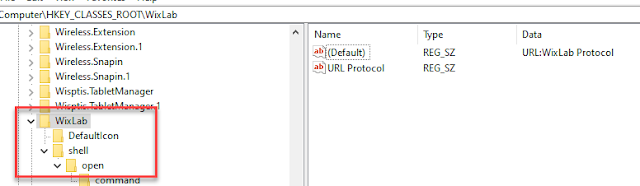
前言 此篇今天在測試Notion筆記的桌面應用程式,針對在登入時,透過網頁啟動應用程式這個功能,感到有點好奇。雖然這不是很新奇的功能,幾年前就在iTune上看過,只是自己 寫的程式,都沒試著去作此功能。 實作 開始前,依照 微軟提供的說明 ,我們需註冊URL相關機碼,reg範例檔案內容如下: [HKEY_CLASSES_ROOT\WixLab] @="URL:WixLab Protocol" "URL Protocol"="" [HKEY_CLASSES_ROOT\kai\DefaultIcon] @="C:\\Program Files (x86)\\WixLab.WpfApp\\WpfApp.exe" [HKEY_CLASSES_ROOT\WixLab\shell] @="" [HKEY_CLASSES_ROOT\WixLab\shell\open] @="" [HKEY_CLASSES_ROOT\WixLab\shell\open\command] @="C:\\Program Files (x86)\\WixLab.WpfApp\\WpfApp.exe /url \"%1\"" 根據上方的機碼內容,在安裝程式時,將內容註冊進去。本範例使用Wix安裝範本作說明(關於Wix請 參考 )。 打開Product.wxs,新增一筆Component如下,紅字 WixLab 為Url Schema開頭。 <!-- 註冊URL執行的機碼--> <Component Id="RunURLComponent" Guid="*"> <RegistryKey Root="HKCR" Key=" WixLab " > <RegistryValue Type="string" Name="URL Protocol" Value=""/> ...

